AI EngineeringLangChainLangGraphApprox. 7 min read
Published 23 Apr 2026 · By Adam C, Core Dynamics
When teams ask us whether they should use LangChain or LangGraph, the real question is usually about control. Do they need a straightforward sequence of model and tool calls, or do they need a stateful execution graph with loops, branches, and recovery paths?
LangChain is excellent when the workflow is mostly linear and can be expressed as a pipeline of steps. LangGraph becomes valuable when the system needs durable, multi-step agent behavior where state and transitions must be explicit.
In practice, this is not an either-or religion. Many production stacks use both. LangChain handles reusable components and tool abstractions, while LangGraph coordinates how those components execute over time.
Quick summary: Use LangChain to build capabilities. Use LangGraph to orchestrate complex agent behavior with explicit state transitions.
The key difference is execution model. LangChain is centered on chains and composable building blocks. LangGraph is centered on state machines represented as graphs.
In LangChain-first flows, execution typically moves forward step by step. In LangGraph-first flows, execution can loop, branch, pause, and resume based on state updates and node outcomes.
That difference matters in reliability work. If you need deterministic checkpoints, retries at node level, human-in-the-loop approval gates, or long-lived agent sessions, graph orchestration usually gives clearer control.
Where LangChain works best
Fast capability assembly
LangChain is great for quickly assembling prompts, retrievers, tools, and output parsers into a usable workflow. It gives teams a broad set of integrations and abstractions to move from prototype to useful internal tooling quickly.
Composable, readable pipelines
For many business workflows, a clean pipeline is exactly enough. Think classify intent, retrieve context, call model, format output. LangChain keeps this understandable and easy to evolve.
Strong fit for MVP-to-v1
If the system does not need persistent graph state, LangChain usually keeps complexity lower and delivery speed higher.
Where LangGraph works best
Stateful agent orchestration
LangGraph is designed for scenarios where the agent must track state across multiple steps and choose transitions dynamically. That includes retry loops, tool fallback policies, and conditional routing after validation.
Durable, controllable execution
When correctness matters more than raw speed, explicit graph nodes and edges make behavior easier to inspect and reason about. It also helps isolate failures to specific transitions.
Multi-actor or supervised workflows
If you need planner-executor patterns, handoffs, or human approvals in the middle of execution, LangGraph maps naturally to that architecture.
Practical rule: The more your system resembles a workflow engine, the more LangGraph tends to be the right control layer.
Framework graphs
Two quick visual references for each framework architecture shape:
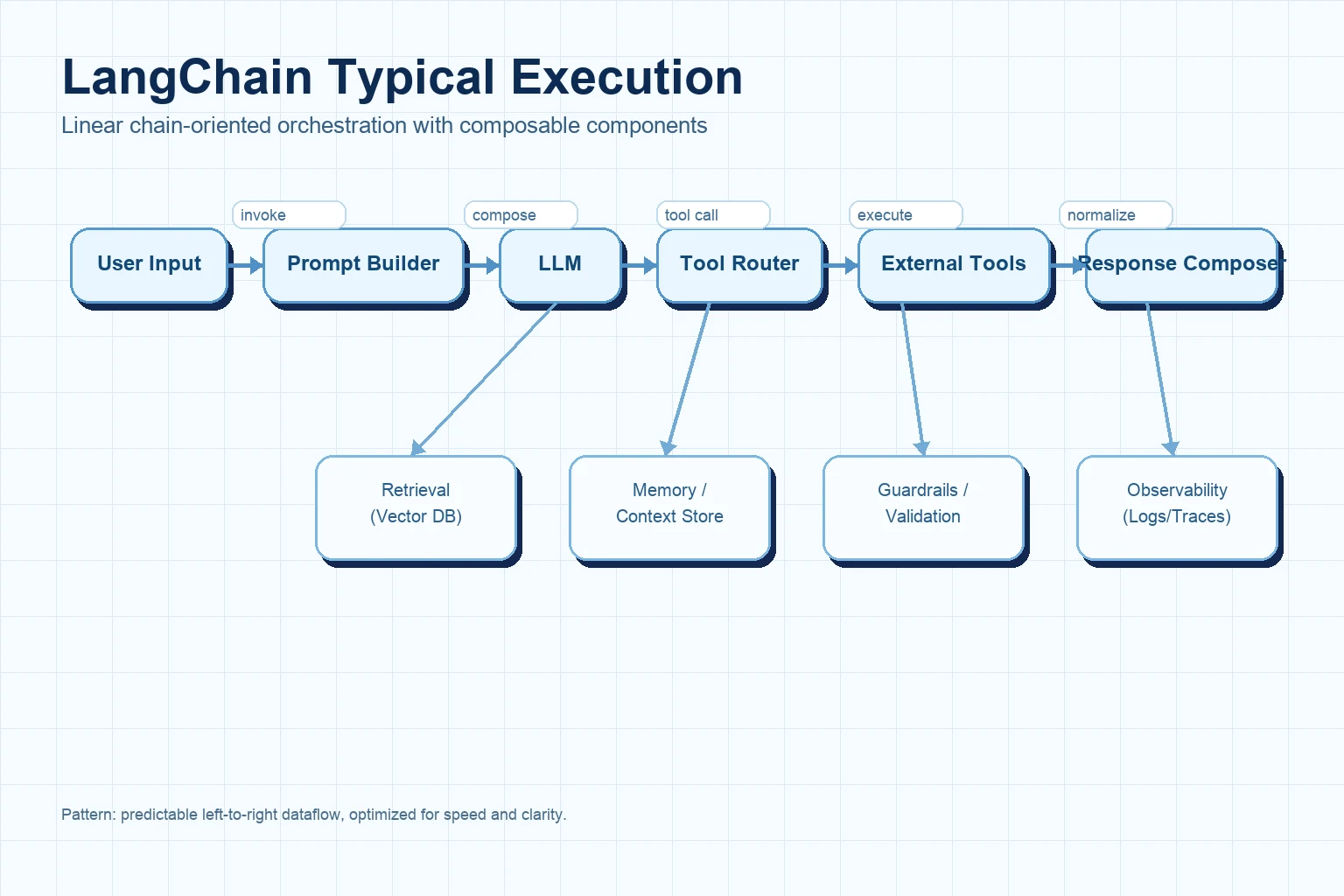
Graph 1: LangChain flow (chain-oriented)
LangChain usually fits flows that look like a directed pipeline: compose prompt and tools, call model, execute tools, return output.
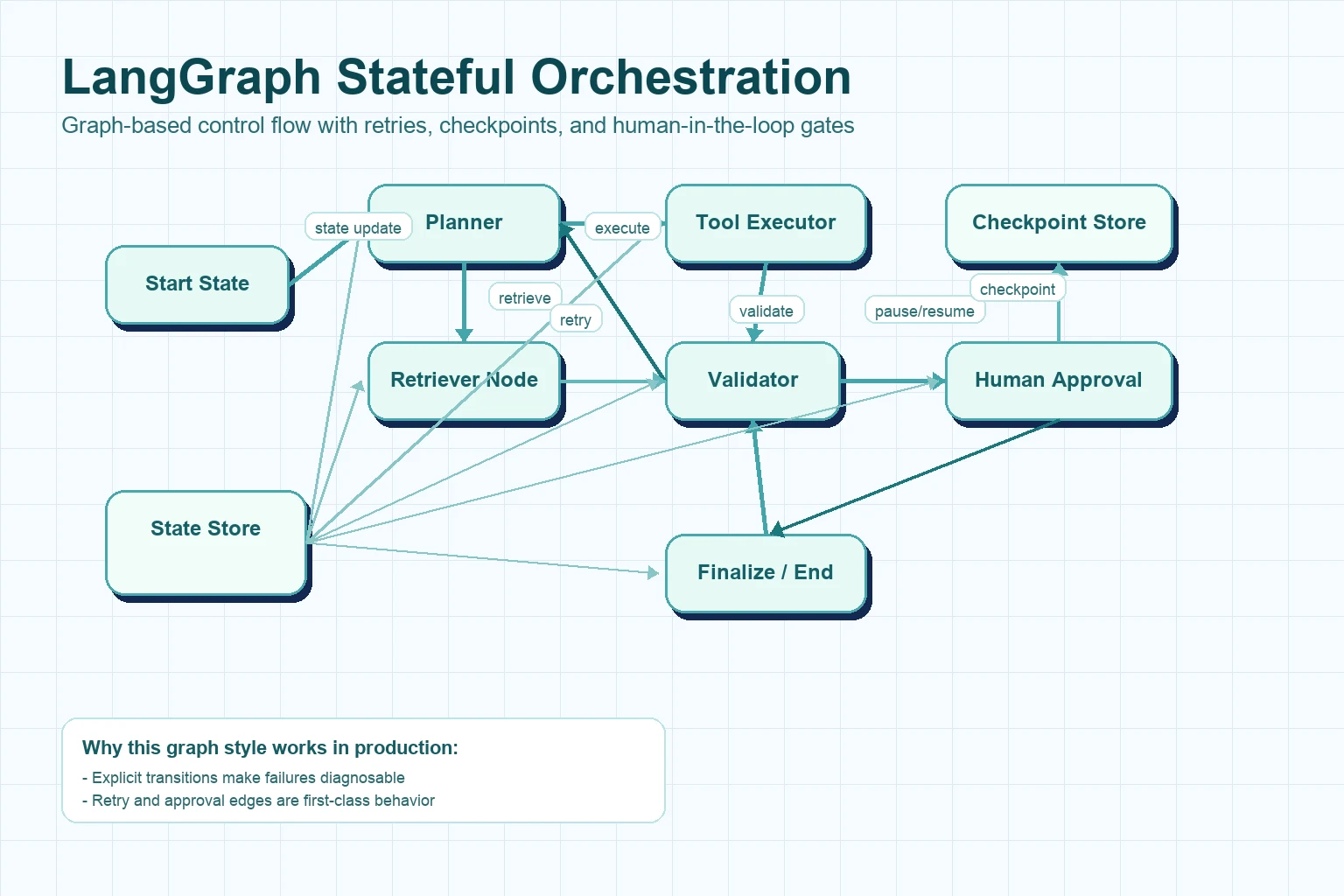
LangGraph models execution as explicit state transitions, which makes loops, retries, checkpoints, and human handoffs first-class architecture elements.
Selection guide for teams
Choose LangChain first if the workflow is mostly linear and your priority is fast delivery with clean abstraction layers.
Choose LangGraph first if the workflow needs branching, retries, durable state, and explicit orchestration control.
Use both together when you want LangChain components inside a LangGraph-controlled runtime for production reliability.
The architecture decision is less about popularity and more about failure modes. If failure handling is simple, chains are usually enough. If failure handling is part of the product behavior, graph orchestration usually pays off quickly.
Final point
LangChain and LangGraph are complementary, not competing religions. The cleanest production systems often treat them as layers: LangChain for capabilities, LangGraph for execution control.
If your team is deciding this week, start by mapping your real runtime behavior. Count branches, retries, approvals, and state transitions. That architecture map will usually tell you which framework should sit at the center.
Previous Article
22 Mar 2026
MCP server architecture basics
ArchitectureMCPAgent SystemsApprox. 8 min read
Published 22 Mar 2026 · By Adam C, Core Dynamics
At Core Dynamics, clients almost never start by saying, "We need MCP." They usually say something more direct: "We want the assistant to read our systems, maybe write later, and we need to know it will not break anything." That is the real brief. By the time teams call us, they are usually done with flashy demos. They want control.
We have been in kickoff calls where the first notes on the whiteboard were not speed or model choice. They were simpler than that. Who can call what? What gets logged? What happens when a backend fails? That is where good MCP architecture starts.
Model Context Protocol, or MCP, gives AI clients a standard way to find tools, call them, and exchange structured context with external systems. In plain terms, an MCP server is the controlled middle layer between an AI client and the systems a business actually runs on: APIs, databases, workflows, documents, and internal services.
The pattern is pretty consistent. Clients want read access before write access. They want a short list of solid tools before a giant catalog. And they want every call to be easy to trace. So for engineers, the job is to expose useful capability without exposing chaos. For everyone else, the simple version is this: the MCP server is the doorway, the guardrail, and the record of what happened.
An MCP server sits between an AI client and one or more backend systems. The client might be a desktop assistant, a browser agent, an internal ops console, or another service. The server publishes tools and schemas. The client discovers those tools, sends structured calls, and gets structured responses back.
Here is the plain-English version. If a chatbot needs to look up a customer invoice, it should not talk straight to the accounting database. It should talk to an MCP server instead. The server exposes a tool like get_invoice(invoice_id), checks the input, applies access rules, calls the right backend, and returns only what the client is allowed to see.
Non-technical summary: The MCP server is the translator and gatekeeper between an AI system and the software it needs to use. It makes the interaction consistent and much safer.
The core architectural layers
A solid MCP server usually has five layers. Early prototypes often mash them together, and that is fine for a week or two. But once real users show up, the separation matters.
1. Transport layer
This is the front door. It handles incoming MCP requests, stream mechanics, content types, and response framing. It should not hold business logic. Its job is to translate protocol traffic into internal application calls.
2. Tool registry and schemas
This layer defines what tools exist, what they are called, what arguments they accept, and what shape they return. Tight schemas matter. Models behave better when the contract is narrow and clear instead of vague and open-ended.
3. Orchestration layer
This is where routing, retries, policy checks, and cross-service composition happen. One tool might call a single backend. Another might touch three systems and stitch the answer together. This layer is where most of the real design work lives.
4. Integration adapters
Adapters connect the server to databases, CRM APIs, file stores, search indexes, or internal services. Keeping them separate stops protocol logic from getting tangled up with vendor SDK code.
5. Observability and policy controls
Production MCP servers need logs, traces, error handling, rate limits, and auth checks. If an AI client can call a tool, you should be able to answer a few basic questions fast: who called it, what they passed in, which system it touched, and what came back.
Practical takeaway: A lot of early MCP builds stop at schemas and tool names. That works right up until the first bad input, permission bug, or backend timeout.
What happens during a request
The easiest way to understand MCP is to follow one request from start to finish.
Discovery: the client learns which tools the server exposes and what input schema each tool expects.
Selection: the language model decides that a tool is needed for the current task.
Invocation: the client sends a structured tool call to the MCP server.
Validation: the server verifies required fields, types, size limits, and policy constraints.
Execution: the orchestration layer invokes the relevant adapter or internal service.
Normalization: raw backend output is transformed into a predictable, model-friendly response.
Return: the client receives the result and uses it in the next reasoning step.
Here is the thing: an MCP server is not just an API wrapper. It is the layer that turns a fuzzy model decision into a clean, deterministic action. If that layer is weak, the whole system gets weird fast.
That is also why "the AI has access to our systems" is the wrong mental model. What matters is that the AI has access only through a small set of server-defined operations, each with a tight contract and a traceable path.
Security and trust boundaries
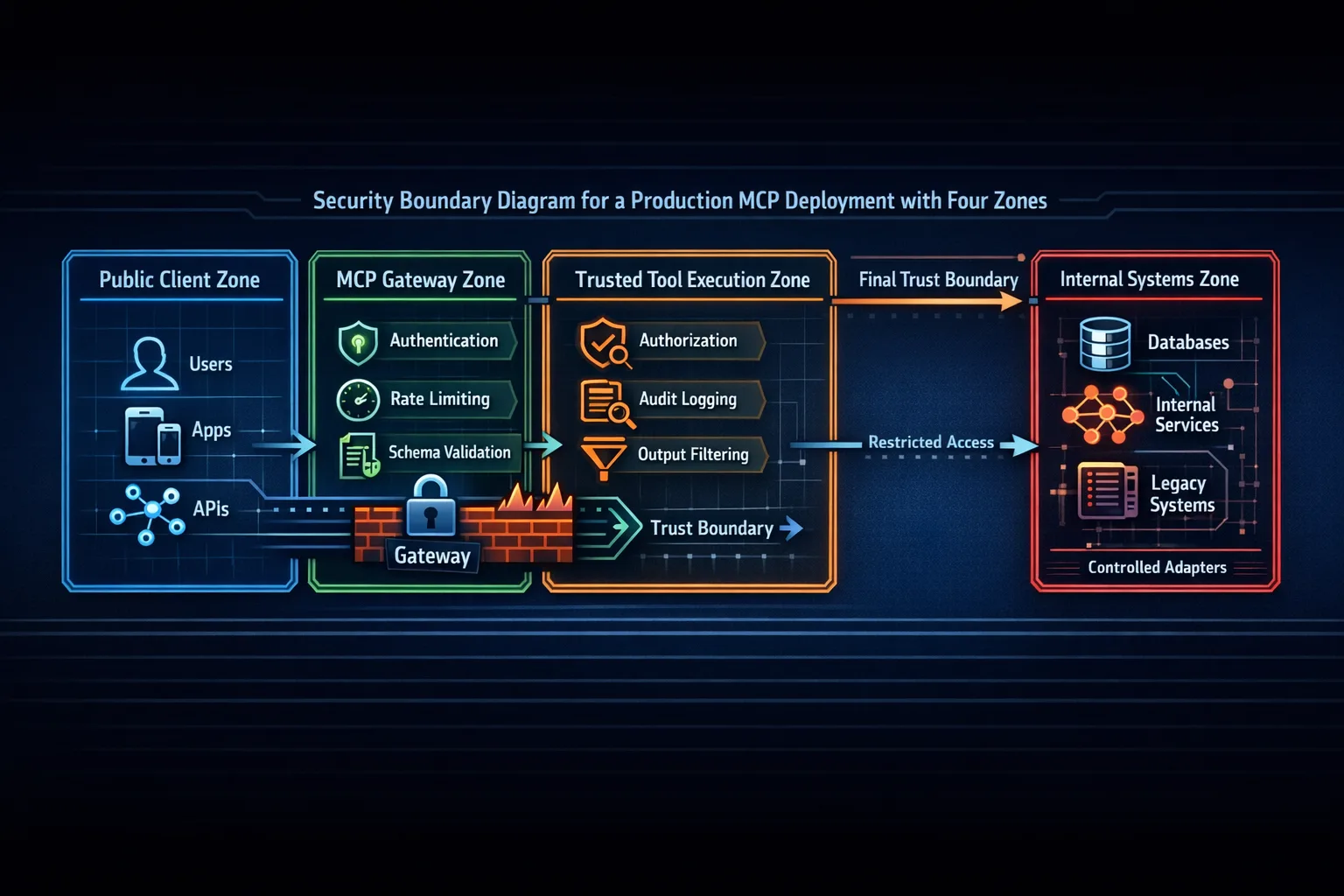
Most MCP architecture mistakes are really trust-boundary mistakes. Teams assume the model will behave if the tool descriptions are clear enough. That is not a security plan. The server should act as if every call could be malformed, too broad, replayed, or made by a client with the wrong permissions.
At a minimum, the server should enforce authentication, authorization, input validation, output filtering, and rate limits. Sensitive tools should sit in tighter lanes. A read-only lookup tool should not live in the same trust tier as a write action that can change records, trigger payments, or open tickets.
We also see teams return too much data because it feels convenient. But convenience is not the goal. If a billing tool needs only invoice status and due date, it should not also return payment history, internal notes, and account IDs unless those fields are clearly required.
Non-technical summary: The risk is not that the AI suddenly turns evil. The risk is that a badly designed server gives it too much authority or too much data for the job at hand.
Patterns that matter in production
Once a prototype touches real users, three patterns matter almost every time.
Thin tools, thick policies
Keep tool interfaces simple, but make policy enforcement deep. A tool should feel easy to call, while the server quietly handles validation, auth checks, idempotency, and backend-specific safeguards.
Stable contracts, replaceable adapters
The client-facing tool contract should stay stable even if the backend changes. That way, you can move from one CRM vendor to another, or from a direct SQL query to an internal service, without retraining users or rewriting the whole client flow.
Trace everything that affects outcomes
Production incidents rarely start in one clean place. They come from a chain: the client picked a tool, passed weak context, the server retried a downstream call, and the result came back half right. Without traces and structured logs, root-cause work turns into guesswork.
A good MCP server should feel boring on a bad day. That is a compliment. It means the system is predictable when things go sideways.
Architecture diagrams
These three views are the ones we use most when we explain MCP projects to clients. First, the structure. Then the request flow. Then the trust boundaries. In our experience, that sequence helps both engineering teams and business stakeholders get to the same picture faster.
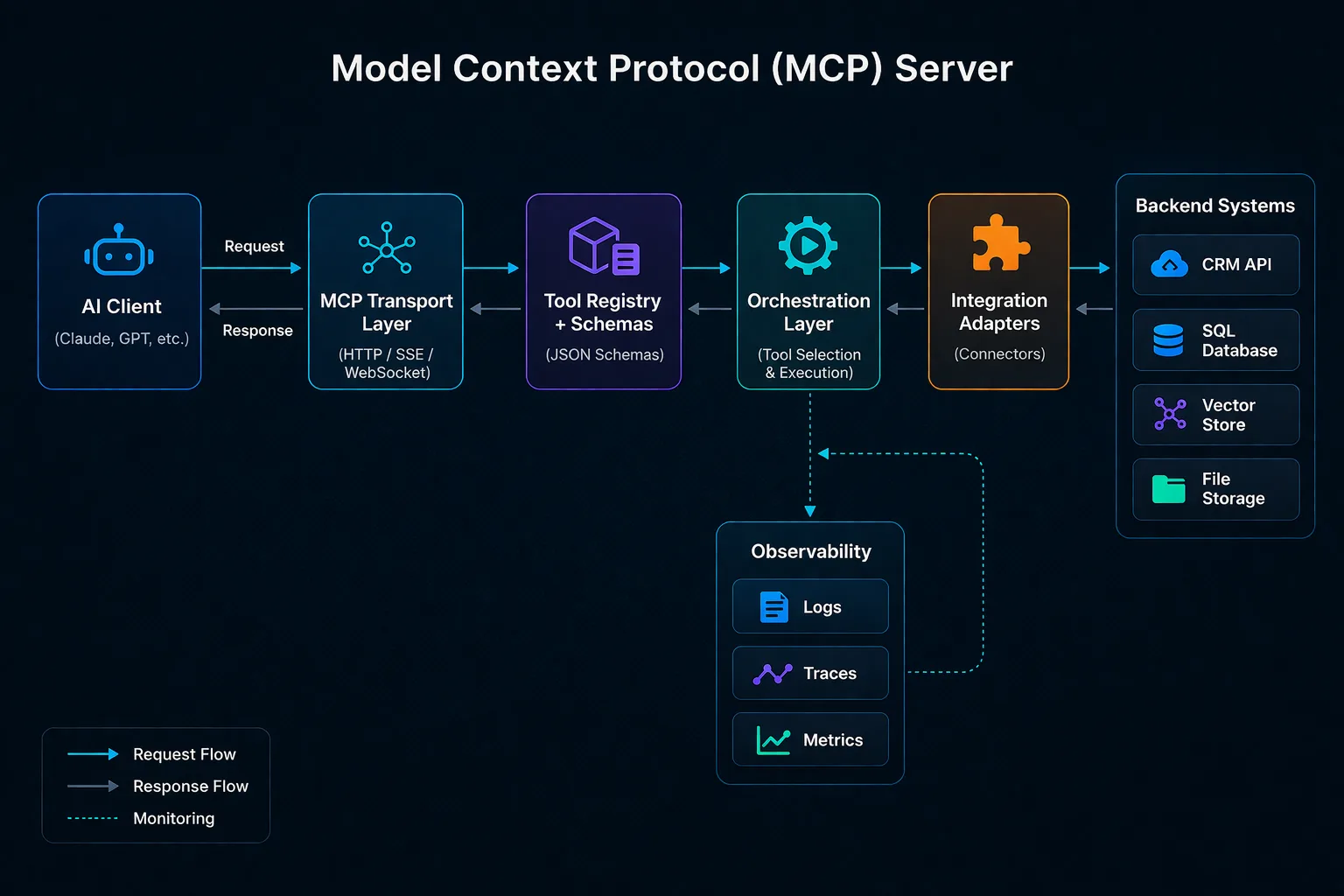
Diagram 1: high-level MCP architecture
High-level MCP architecture: the client talks to a protocol-facing transport, which resolves tools through schemas, invokes orchestration logic, and reaches backend systems through integration adapters. Logs, traces, and metrics sit beside execution from day one.
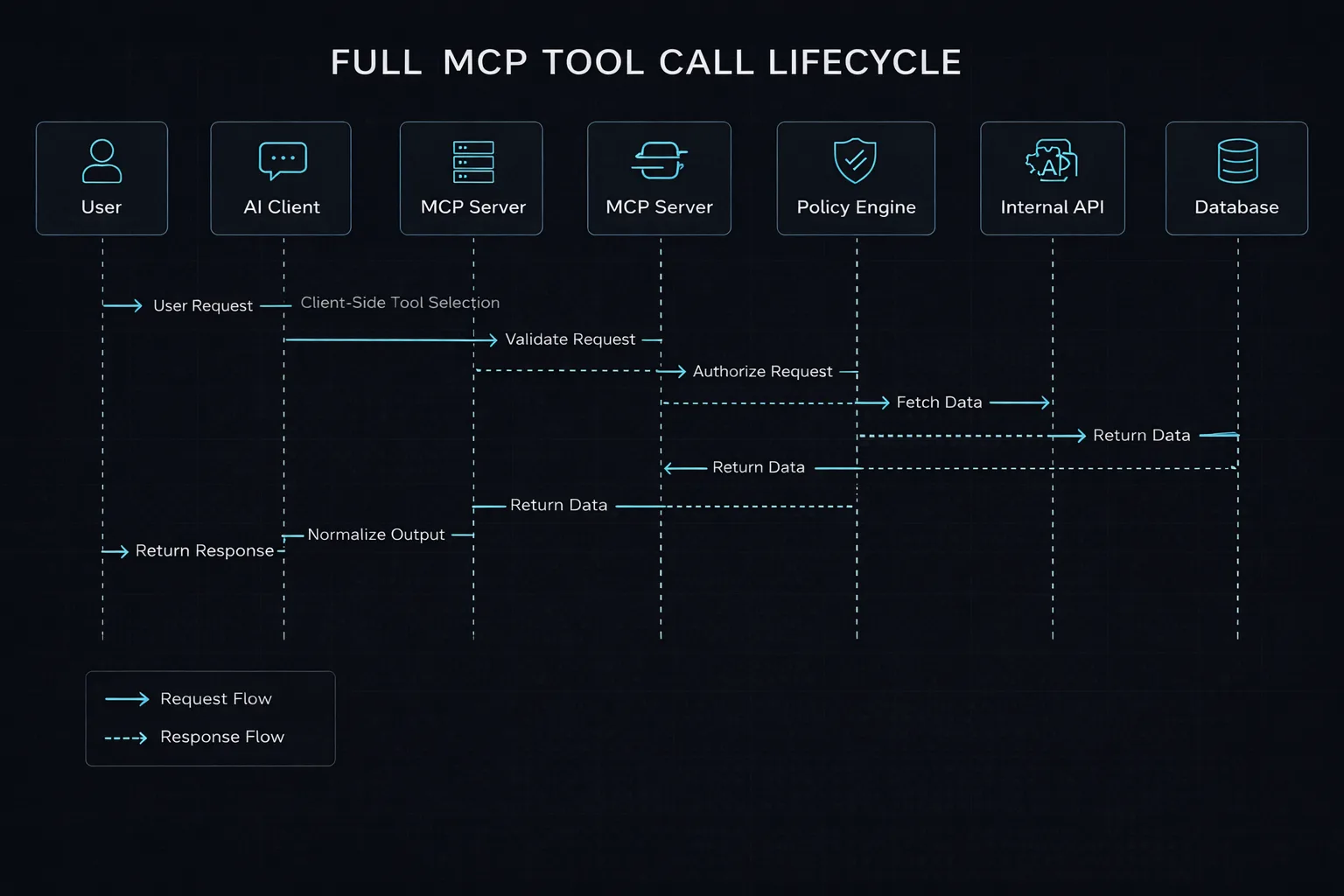
Tool call lifecycle
The lifecycle view shows that a tool call is not one quick backend jump. It is a controlled sequence: request interpretation, tool selection, validation, policy checks, downstream execution, normalization, and response.
Trust boundaries and security zones
The security view highlights the main production rule: trust should narrow as the request moves inward. Authentication, validation, authorization, logging, and output filtering are part of the architecture, not extras you add later.
Final point
MCP matters because it forces teams to be clear. Clear tool boundaries. Clear schemas. Clear permissions. Clear execution paths. That is what turns an agent system from a demo into something a real team can trust.
At Core Dynamics, that is what clients ask us for most once the first prototype hits real systems. Fewer surprises. Tighter boundaries. Better logs. Tools that keep working after the demo video is over. It is rarely about adding more tools. It is usually about making the right tools behave well.
If I had to boil it down to one rule, it would be this: keep the tool surface small, keep the policy layer strict, and keep the logs readable. Do that, and MCP stays useful. Skip it, and the architecture can look fine right up until it does not.